 Pictopoem
AI photo-to-poem app for iPhone & iPad
Turn any photo into a poem
A landscape, a street corner, a moment with someone you love. Pictopoem reads the light, the season and the feeling in your photo, writes a short poem for it, and sets it on a card you can share or print.
Download on theApp Store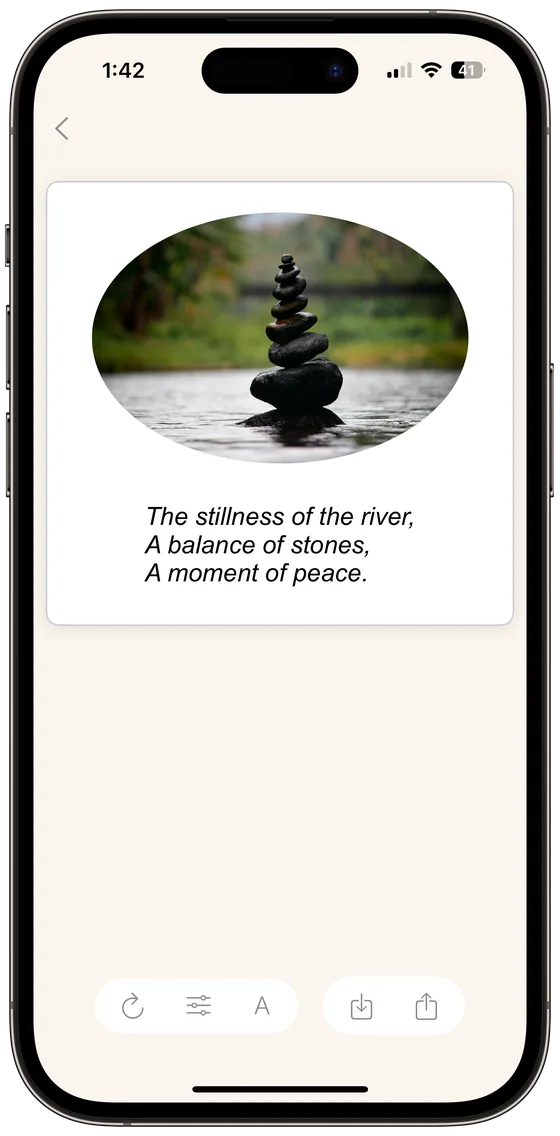
How it works
Three taps from a photo to a poem.
-
Choose a photo
Any photo in your library works: a trip, a street at dusk, your dog in mid-jump.
-
Pick a form, if you like
Let Pictopoem decide, or ask for a haiku, a limerick or an ode. You can also add an occasion, a season, or the age of the person in the photo.
-
Style it and share
Change the font, colors, frame and photo shape. Then share it, save it, or print it with AirPrint.
Poem forms
Free verse is the default. Choose a form when you want a particular shape.
Free verse
No fixed meter or rhyme. Usually the most natural fit for a photo.
Haiku
Three short lines in the 5-7-5 tradition, rooted in nature and a single moment.
Limerick
Five bouncing lines that rhyme AABBA. For photos that deserve a laugh.
Ode
A poem of praise, addressed to the person, place or thing in the picture.
Elegy
A quiet, reflective poem of loss and remembrance.
Ballad
A short story in verse, with the rhythm of a song.
Aphorism
Not a poem at all: one short line worth keeping.
Japanese and Chinese poems, too
The poem language is its own setting, separate from the app's language. Ask for a haiku, tanka or senryū in Japanese, or a jueju quatrain, lüshi or ci in Chinese. Simplified and Traditional Chinese poems are each written on their own, not converted from one another, and can be set vertically.
Made to keep
A poem card should look as considered as the poem.
-
For the occasion
Birthday, holiday, love, graduation, new baby, friendship, achievement, sympathy, good luck or encouragement. Tell Pictopoem what the photo is for.
-
Season and age
Set the season, or who is in the photo, from a toddler to a grandparent, and the poem's voice follows.
-
When and where
Let the poem quietly reflect when and where the photo was taken, or turn it off.
-
Your layout
Fonts, colors, frames, gradient backgrounds and photo shapes such as circles and ovals. Japanese and Chinese poems can run vertically.
-
Print a real card
Send a poem card straight to your printer with AirPrint.
-
My Poems
Every poem you save or share is kept in My Poems, ready to edit again.
Poems written by Pictopoem
Every poem below was written by the app from the photo beside it.
Questions
Is Pictopoem free?
Yes. You can create 3 poems a day for free. Premium membership unlocks unlimited poems and every layout option.
Which devices does it run on?
iPhone and iPad with iOS 17 or later.
Which languages can it write in?
English, Japanese, Simplified Chinese and Traditional Chinese. The poem language is set separately from the app's language, so an English-language iPhone can still ask for a haiku in Japanese.
Can I choose the type of poem?
Yes. In English you can choose free verse, haiku, limerick, ode, elegy, ballad or a one-line aphorism. Japanese adds tanka, waka, chōka and senryū; Chinese adds jueju quatrains, lüshi, ci, ancient-style verse, modern verse and doggerel.
What happens to my photos?
Your photo is sent securely to our server only to write your poem, and it is deleted as soon as that is done. It is never stored or used to train AI models. Read the Privacy Policy.
Can I print a poem card?
Yes. Pictopoem supports AirPrint, so you can print a card on any compatible printer.
Can I edit a poem after saving it?
Yes. Saved and shared poems are kept in My Poems, and you can reopen any of them to change the layout.
How do I get in touch?
Email [email protected]. We read everything.